Writing your own widgets
A widget is a folder with two files, manifest.json and index.html, in ~/Library/Application Support/Wingmirror/widgets/. The panel picks a new folder up within a couple of seconds and reloads a widget whenever one of its files is saved.
Start one from a terminal. From the installed app (in ~/Applications if you built it with tools/make-app.sh):
/Applications/Wingmirror.app/Contents/MacOS/Wingmirror widget new needs-me "Needs Me"or from a checkout of this repository:
swift run Wingmirror widget new needs-me "Needs Me"That creates a working widget that counts the sessions at work. Here it is changed to count the sessions waiting for you, and to turn to the accent colour when there are any.
manifest.json:
{
  "id": "needs-me",
  "name": "Needs Me",
  "version": "1.0.0",
  "sizes": [[2, 2], [3, 2]],
  "data": ["sessions"],
  "actions": [],
  "network": [],
  "settings": []
}index.html:
<!doctype html>
<html lang="en">
<head>
<meta charset="utf-8">
<title>Needs Me</title>
<link rel="stylesheet" href="/web/tokens.css">
<style>
  #root { position: absolute; inset: 0; box-sizing: border-box; padding: 20px 24px;
          border: 1px solid var(--wm-line); border-radius: var(--wm-radius);
          display: flex; flex-direction: column; justify-content: space-between; }
  #count { font-size: 150px; font-weight: 500; line-height: 1; }
  #root.asking { border: 2px solid var(--wm-accent); }
  .asking span { color: var(--wm-accent); }
</style>
</head>
<body>
<div id="root">
  <span class="wm-label">Waiting for you</span>
  <span id="count" class="wm-mono">0</span>
</div>
<script src="/web/sdk/wm.js"></script>
<script>
(async () => {
  await wm.ready();
  wm.subscribe("sessions", (sessions) => {
    const waiting = sessions.filter((s) => s.state === "waiting_permission" || s.state === "needs_input").length;
    document.getElementById("count").textContent = String(waiting);
    document.getElementById("root").classList.toggle("asking", waiting > 0);
  });
})();
</script>
</body>
</html>
Tap Edit, then Widgets, and it is in the list.
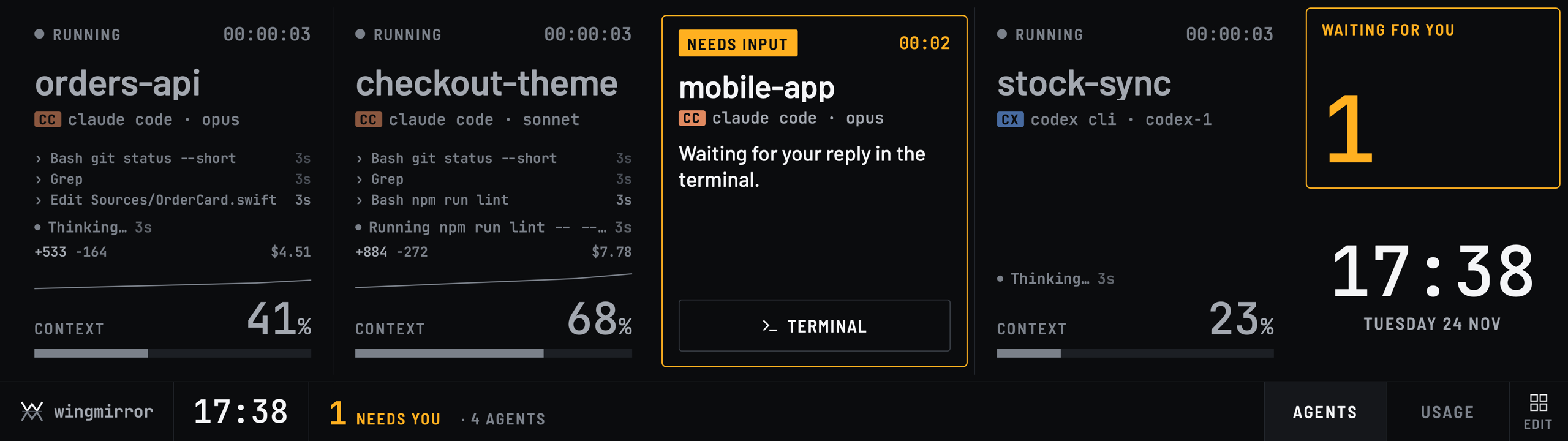
What the example uses:
sizesare the sizes the widget was designed at, counted on a 12 by 4 grid (one cell there is two by two cells in the editor).[2, 2]is 416 × 296 pixels.datalists the topics the widget may subscribe to.wm.subscribecalls back with the current value at once, then on every change.tokens.csscarries the panel's colours, fonts and shared classes, and follows the owner's look. Usevar(--wm-accent)and the rest; name no colour of your own.actionsandnetworkare empty: this widget does nothing but draw, and connects to nothing.
Check a widget, and zip it to hand to someone else:
swift run Wingmirror widget validate ~/Library/Application\ Support/Wingmirror/widgets/needs-me
swift run Wingmirror widget pack     ~/Library/Application\ Support/Wingmirror/widgets/needs-me
A widget with errors is kept off the panel. To install a packed widget, unzip the .wmwidget file into the widgets folder.
A widget that lists resolve_pending, answer_pending, open_terminal, set_display, run_action, hide_session or end_session among its actions is asking to reach outside the panel. Nothing happens until you allow it under Widget Permissions in the menu, and the permission lapses whenever the widget's files change.
docs/widget-authoring.md is the guide: the manifest fields, the SDK, the topics and what each carries, the actions, the tokens, the rules that keep a widget readable on this panel, and two longer examples.