Install and set up
Requirements
For the panel itself, worked with the mouse:
- macOS 14 or later, on Apple Silicon.
- Any display. The panel is a window, or covers the whole of a display you choose.
- Claude Code, Codex, GitHub Copilot, Cursor, or an agent you can make send an HTTP request.
For touch, and for brightness, blanking and sleep from the app:
- A Corsair Xeneon Edge, connected by USB-C to a port that carries video. One cable carries video, power and touch. With video over HDMI the USB-C cable is still needed, for power and touch.
The Edge is what Wingmirror was built on and the only display it has been used on by a person. See Without an Edge for what works without one and what does not.
Without an Edge
With no Edge attached the panel opens in an ordinary window on the main display, and moves to the Edge by itself if one is connected later. That is Automatic, and it is how the app starts. Panel ▸ Panel On in the menu has the other choices:
| Choice | What it does |
|---|---|
| Automatic (the Edge when attached, otherwise a window) | As above. |
| Full Screen on a display | One line for each attached display. The panel covers that display inside its menu bar and Dock. It is an ordinary window in every other way: it is not above the menu bar, it stays on the Space it opened on, and other windows can be brought in front of it. Choosing your main display asks first, and says how to get back: the menu bar icon stays where it is. Choosing the Edge is the Edge as Automatic has it, with touch. |
| In a Window | A window even with the Edge attached. It can be resized, keeps the panel's shape, goes no smaller than 1280 × 360, can be dragged to any display, and opens next time where it was left. |
The choice is kept. A chosen display is known by what macOS knows it by, not by its name, so two displays of the same model are told apart; the menu marks the main display, and numbers displays that would still read the same from the left. If the chosen display is not attached the panel goes where Automatic puts it, the menu says so, and it goes back when the display returns. Changing the choice moves the panel at once and loads its page again.
The panel is always drawn as 2560 × 720 and scaled as one piece to fit what holds it. On a display of another shape it sits in the middle, with bands of the panel's own background above and below it, or to either side. On a 16:9 display it takes about the middle half of the height.
What works on any display, with the mouse: every session and its card, Approve, Deny and the other answers, the settings area and everything arranged in it, the ambient page, and every widget.
What needs the Edge:
- Touch. On another display a click does what a tap does. The menu's Touch line says "Touch: needs a Xeneon Edge", and the setup window asks for no permission.
- Brightness, blanking, sleep and Reset Picture, and the two rules that dim and wake the panel. The menu's Display group says "Brightness, blanking and sleep need a Xeneon Edge", and the Display screen of the settings area says the same in place of its controls. The Panel widget, if it is on a page, says "Controls unavailable".
- With an Edge attached and the panel on some other display, those controls still act on the Edge, and the menu says so above them. Blanking then also covers the panel where it is, as it does on the Edge, until a click or Wake Panel.
No display other than the Edge has had the panel on it in front of a person: this is checked by tests and by pictures drawn off screen, as Status and known limits says.
Install
From a release
No release has been published yet, and the repository is private for now. Until that changes the only way to get the app is to build it from source, which needs access to the repository. When there is a release it will be at https://github.com/ecomlabsio/wingmirror/releases, and installing it will be:
- Download
Wingmirror-<version>.dmgfrom the releases page and open it. - Drag Wingmirror to Applications, then open it from there.
From source
git clone https://github.com/ecomlabsio/wingmirror.git
cd wingmirror
tools/make-app.sh
open ~/Applications/Wingmirror.app
That builds ~/Applications/Wingmirror.app, signed ad hoc. An ad hoc build has to be allowed Input Monitoring again after every rebuild; see Permissions it asks for. Building from source has the rest.
First launch
Wingmirror has no Dock icon; it lives in the menu bar, as a small mark of two zig-zags with a line between them. The first time it is opened as an app it shows the setup window. Afterwards the window is under Setup… in the menu.
When the app opens it may also ask one or two questions, each at most once per launch:
- "Update the Claude Code connection?" or "Update the Codex connection?", when a connection made by an earlier version lacks something this version listens for. See the two connection sections below.
- "Wingmirror version is available", when the update check finds a newer release.
If another copy already has the port it says "Wingmirror could not start" and quits.
The setup window
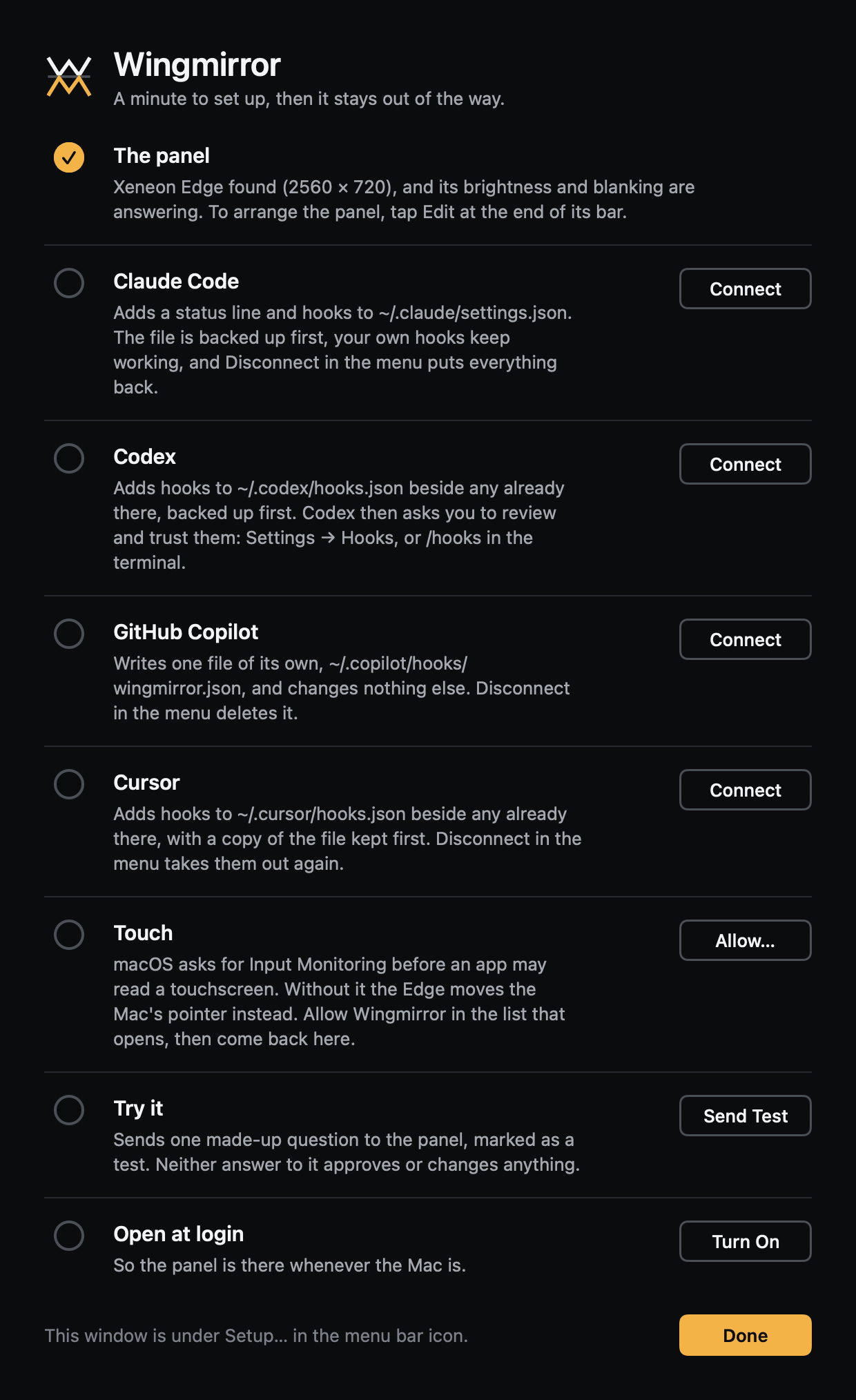
Each row has a circle that fills in when the step is done, and a button when there is something to do. The window looks again once a second, so a permission allowed in System Settings shows up without a click. On a screen too short for every row, the rows scroll and Done stays in view.
| Row | What it says | Button |
|---|---|---|
| The panel | "Xeneon Edge found" with its size and "The panel is on it now.", whether the Edge's brightness and blanking are answering, and that the panel is arranged from Edit at the end of its bar. Without an Edge, or with the panel put elsewhere: that it is in a window or full screen on the display named, worked with the mouse, and that touch, brightness, blanking and sleep need the Edge. | None |
| Claude Code | What Connect adds to ~/.claude/settings.json; "It is partly connected now; Connect repairs it." when some of it is already there; "Connected." once done. | Connect |
| Codex | Shown only if the folder ~/.codex exists. What Connect adds to ~/.codex/hooks.json, and that Codex then asks you to review and trust the hooks. | Connect |
| GitHub Copilot | Shown only if the folder ~/.copilot exists. That Connect writes one file of its own, ~/.copilot/hooks/wingmirror.json, and changes nothing else. Once connected, where its requests are answered: in Copilot, or, with Ask on the Panel Before Risky Commands ticked in the menu, on the panel for a command that looks risky. | Connect |
| Cursor | Shown only if the folder ~/.cursor exists. That Connect adds hooks to ~/.cursor/hooks.json beside any already there, with a copy of the file kept first. Once connected, where its requests are answered: in Cursor, or, with Ask on the Panel Before Risky Commands ticked in the menu, on the panel first for a shell command that looks risky, where Deny refuses it and Approve leaves it to Cursor's own settings. | Connect |
| Touch | That macOS asks for Input Monitoring before an app may read a touchscreen. Once allowed: "Input Monitoring is allowed, but macOS applies it when the app next opens." Once working: "On." | Allow…, then Reopen Wingmirror |
| Try it | That it sends one made-up question to the panel, marked as a test. Then "Waiting for a tap on the panel…", and once tapped, "Answered on the panel" with the answer; or that nobody tapped within a minute and the question has gone. | Send Test, then Send Again |
| Open at login | Shown when running from the app bundle. | Turn On or Turn Off |
Connect in this window makes the change straight away, without a second question; the row itself says what will change. If a step fails, the reason appears under the rows in the accent colour. For Claude Code nothing is changed in that case; for Codex, which is connected through two files, the message says which of them was not changed. Done closes the window.
Send Test proves the whole path without an agent: the app asks its own bus a question the way any agent would (see Cards and questions), the question shows on the Agents widget, on a card headed "Setup test", as "This is a test from Wingmirror's setup window. Can you see it on the panel?" with Yes and No, and the row's circle fills when either is tapped. It is a question, not a request to approve, so neither answer permits anything. It is asked under the agent name wingmirror-setup, stays for a minute at most, is taken off the panel if the window is closed first, leaves no card behind, and does not put the dot beside the menu bar icon. While it waits the bar counts it among what needs you, since it does. It is not counted in the Figures widget or the timeline, and does not wake or brighten the panel.
For touch: press Allow…, switch Wingmirror on in the Input Monitoring list that opens, come back, and press Reopen Wingmirror. The app quits and opens again a second later with touch on.
Permissions it asks for
| Permission | When | Why |
|---|---|---|
| Input Monitoring | During setup | macOS requires it before an app may read a touchscreen. Wingmirror takes the Edge's touch controller for itself so that taps reach the panel and nothing else. It reads no keyboard and no other device. |
| Control of Terminal or iTerm | Once, the first time you tap Terminal on a session running in one of them | To select that session's tab and raise its window. If you refuse, the button brings the app forward and no more. To allow it later: System Settings, Privacy & Security, Automation. |
It asks for nothing else: not Accessibility, not Screen Recording, not Full Disk Access.
An ad hoc build and Input Monitoring. macOS ties Input Monitoring to the app's signature, and an ad hoc signature is different for every build. After each rebuild the setting can show Wingmirror as allowed while touch stays off. Clear the old entry and allow the new build:
tccutil reset ListenEvent app.wingmirror.WingmirrorThen, in the menu, choose Open Input Monitoring Settings…, switch Wingmirror on, and choose Retry Touch. If the Touch line still says it was refused, quit the app and open it again: macOS applies the permission when the app next opens. A build signed with a Developer ID should keep the permission across rebuilds; that has not been tried.